Circular time-wheel planner for visual, gesture-driven project management
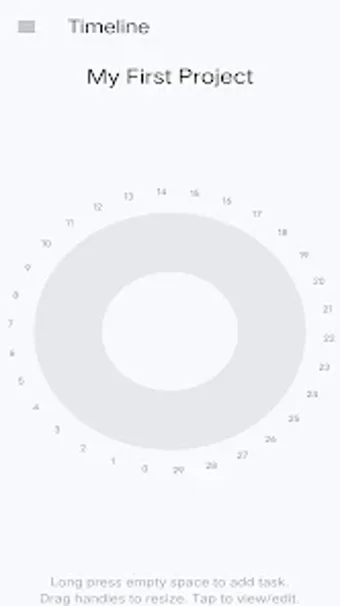
Displays projects as a continuous rotating time wheel, letting you spin to browse dates and drag task handles to resize durations. 959FFolio, by eromasoni, sits in the Android games category but acts as a minimalist, offline project organiser. Key functions include a circular timeline view, long-press task creation, progress indicators on the wheel, and a side drawer for multiple projects. It fits visual planners, students, and managers who prefer gesture-based scheduling.
What the app does and the core loop it creates
In this app, time is presented as a single circular timeline rather than vertical lists or Gantt bars. The player or user spins the wheel to move through dates, long-presses to add tasks, and drags handles on arc segments to change start times and durations. Progress is shown directly on those arcs, so checking status means glancing at the wheel instead of opening task menus. The workflow is one-touch manipulation of a continuous cycle.
How modes and mechanics shape daily use
In this app, all activity happens locally and alone: it supports single-project views and a side drawer to switch among multiple projects, not networked play. Gesture mechanics include spinning, dragging, and long-press creation, which replace nested menus and dialog-heavy editing. The mechanic set enforces direct manipulation: adjust an arc to move a task, or rotate the wheel to align dates, which keeps interaction in the visual plane rather than text fields.
How the presentation and controls affect clarity and adoption
In this app, the circular visual puts duration and sequence into the same spatial cue, with task arcs and completion markers visible on the wheel. The interface is minimalist, with drag-to-adjust handles and a side drawer for project switching. Audio is not mentioned, and the design emphasises touch gestures over layered UI. Because all data is stored locally, privacy and offline access are guaranteed, but collaboration mechanisms are absent by design.
Recommendation for visually oriented, offline project planners
The app suits people who prefer spatial, gesture-led scheduling rather than list-based project managers; it's compact, offline, and keeps everything on the device. However, its audience is small at present, with fewer than 100 installs reported, so expect limited community feedback and no built-in collaboration. For individual students and managers who want a tactile timeline instead of linear charts, it's worth trying.